
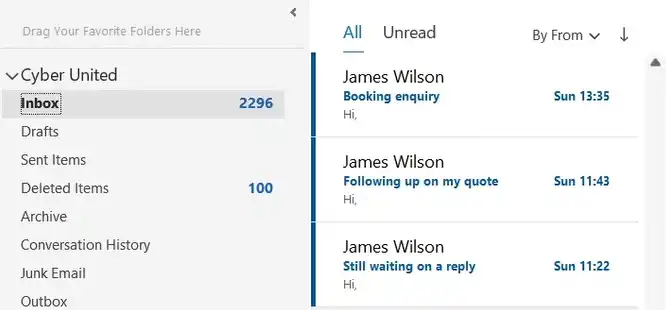
Every missed lead is a missed opportunity.
For many businesses, enquiries arrive through email every day. Website forms, referrals, quote requests, partnership opportunities, and customer questions all land in the same inbox as newsletters, receipts, and internal messages.
The problem? Important leads get buried.
If your inbox feels chaotic, you are not alone. Many business owners lose potential customers simply because there is no clear system for managing incoming enquiries.
The good news is that this can be fixed.
With the right processes, automations, and tools like Inbox Mate, you can stop missing leads, respond faster, and turn your inbox into a reliable sales channel.
Why Businesses Miss Leads in Their Inbox
Most businesses do not miss leads on purpose. It happens because inboxes become overloaded and unmanaged.
Common reasons include:
- Too many emails arriving each day
- Important enquiries mixed with low-priority messages
- No process for assigning leads to the right person
- Delayed responses because the team is busy
- Emails opened but forgotten
- Multiple people checking the same inbox
- No visibility on which leads have been answered
Without structure, it becomes easy for valuable enquiries to slip through the cracks.
The Real Cost of Lost Enquiries
Missing one lead may not seem like a big issue, but over time the cost adds up.
If your average customer is worth £1,000 and you miss just two leads each month, that is £24,000 in lost revenue over a year.
Now combine that with:
- Damage to your reputation from slow replies
- Leads choosing faster competitors
- Team frustration from inbox chaos
- Time wasted searching for messages
Your inbox should help generate business, not lose it.
Sign 1: Leads Are Getting Lost
Have you ever found an enquiry days later and realised nobody replied?
This is one of the biggest warning signs that your inbox needs a better system.
When emails sit unread or disappear into folders, your pipeline becomes unreliable.
How to Fix It
Create a clear lead intake process where every new enquiry is:
- Identified immediately
- Tagged correctly
- Sent to the right person
- Tracked until completed
With Inbox Mate, incoming enquiries can be organised automatically so important messages stand out from the moment they arrive.
Sign 2: Slow Response Times
Speed matters.
Many customers contact multiple businesses before making a decision. The first helpful response often wins.
If your replies take hours or days, you are giving competitors the advantage.
How to Fix It
Use automation to acknowledge enquiries instantly and route them to the right team member.
Examples include:
- Auto-confirmation emails
- Priority alerts for urgent leads
- Instant notifications to sales staff
- Pre-set reply templates for faster responses
Inbox Mate helps businesses reduce delays and improve response times without adding more admin.
Sign 3: No One Knows Who Owns the Lead
Shared inboxes can create confusion.
One person assumes someone else has replied. Another opens the message but gets distracted. Nobody follows up.
This is how warm leads go cold.
How to Fix It
Use clear ownership rules.
Every enquiry should be assigned to a specific person with visibility for the wider team.
That means:
- No duplicate replies
- No ignored messages
- Clear accountability
- Faster follow-up
Sign 4: Everything Feels Urgent
When every email looks the same, your team cannot tell what needs attention first.
A sales enquiry worth thousands should not be treated the same as a newsletter or routine supplier email.
How to Fix It with Prioritisation Systems
Set rules that automatically sort messages based on importance.
For example:
- Website quote requests = High Priority
- Existing customer support = Medium Priority
- Marketing emails = Low Priority
Inbox Mate can help create prioritisation systems so your team focuses on the emails that matter most.
The Power of Auto-Routing
Auto-routing means emails go straight to the right place without manual sorting.
Instead of someone checking every message and forwarding it, the system does the work for you.
Examples:
- Sales leads → Sales team
- Support requests → Support team
- Accounts queries → Finance
- VIP customers → Priority folder
This saves time, reduces mistakes, and gets faster responses to the right people.
Build a Lead-Ready Inbox in 5 Steps
Here is a simple framework any business can use:
1. Audit Your Current Inbox
Review how enquiries currently arrive, who responds, and where delays happen.
2. Identify High-Value Leads
Define what types of enquiries matter most to your business.
3. Create Sorting Rules
Use folders, tags, or automation to separate leads from general email.
4. Assign Ownership
Make sure every enquiry has one clear owner.
5. Measure Performance
Track response times, missed emails, and conversion rates.
Why Businesses Choose InboxMate
InboxMate is designed to help businesses turn messy inboxes into organised systems.
It helps you:
- Capture enquiries faster
- Prioritise important leads
- Automate repetitive inbox tasks
- Improve team collaboration
- Respond quicker
- Reduce missed opportunities
Instead of reacting to email chaos, you create a system that supports growth.
Final Thoughts
Your inbox should be one of your best tools for winning business.
If leads are being missed, responses are slow, or your team lacks a clear process, the problem is not the volume of email. It is the system behind it.
Fix the system, and results improve.
How many leads are sitting in your inbox right now waiting for a reply?
Every delayed response is a chance for a competitor to win the business first. Inbox Mate helps you organise enquiries, prioritise high-value leads, and respond faster without adding more work to your day.
If you’re ready to stop losing opportunities and turn your inbox into a system that drives growth then your inbox needs InboxMate.